
.png)
What are Tactile Jr Cards?

You can use Tactile Jr Cards (based on Scratch Tactile) in 3 different ways.
1. Code Students
The students will move around the space and act... as if it were a play. This is ideal for introducing new concepts to the whole group.
If you wish, you can draw a grid on the floor, or use the tiles as a reference for the students' movement.
2. Code Characters (sprites)
Do the same activities as with Scratch Tactile Original, programming the characters (sprites) and objects on the cards. The cards include 11 different characters and objects to create games and stories. Each one must be programmed separately. You can also incorporate real objects, toys, stuffed animals, etc., into your stories.
If you want, you can draw a large grid as a game board or use the floor tiles as a reference for the characters' movement.

3. Code Robots
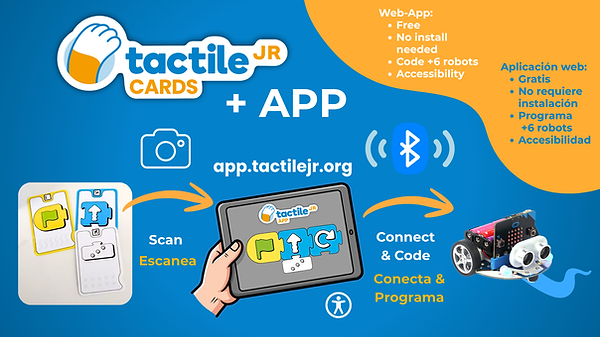
Thanks to the QR codes included on the cards, you can program a sequence with the cards, and then program real robots!
To program robots, follow these steps:
a) Select the cards that have a robot icon on their back. These are the cards compatible with ground robots.
b) Access the web application app.tactilejr.org and select "Robot Mode". We recommend using the Chrome browser. It currently works on any computer with a camera and Bluetooth, and on Android mobile devices or tablets (the iOS app will be released during Q3 2026).
c) Create your sequence with the cards and scan them with the camera inside the app.
d) Connect your robot using your device's Bluetooth
e) Click on the green flag to start!
You did it!
You can create new programs with the cards and/or the App and easily reprogram the robot by repeatedly clicking the green flag!

Go to...
